WhatsApp Automation for Coaching Institutes: Your Playbook
Automate WhatsApp for your coaching institute to boost enrollments. Learn 5 steps for auto-replies, follow-ups, and reminders, improving lead conversion by 30%.


For coaching institutes in India, WhatsApp isn't just a communication channel; it's the nerve centre for admissions. Automating your WhatsApp interactions can transform how you handle enquiries, follow up with prospects, and onboard new students. This playbook will guide you through setting up a robust WhatsApp automation system to boost enrollments and free up your team.
Prerequisites for WhatsApp Automation
Before you dive into automating your WhatsApp communications, ensure you have these essentials in place:
- WhatsApp Business API Access: This is non-negotiable for true automation, team collaboration, and compliance. The standard WhatsApp Business App is limited to one user and basic automation. The API allows for approved message templates, unlimited agents, and integration with CRM systems.
- A CRM with WhatsApp Integration: To manage leads, track conversations, and trigger automated sequences effectively, you need a CRM that natively integrates with WhatsApp Business API. Tools like OpsLoop (Disclosure: OpsLoop is our product) are built for this, offering WhatsApp-first workflows.
- Approved Message Templates: WhatsApp requires pre-approved templates for outgoing automated messages. Plan your common messages (welcome, follow-up, reminders) and get them approved beforehand.
- Clear Communication Funnel: Map out your typical student journey from enquiry to enrollment. This will help you identify key touchpoints where automation can add value.
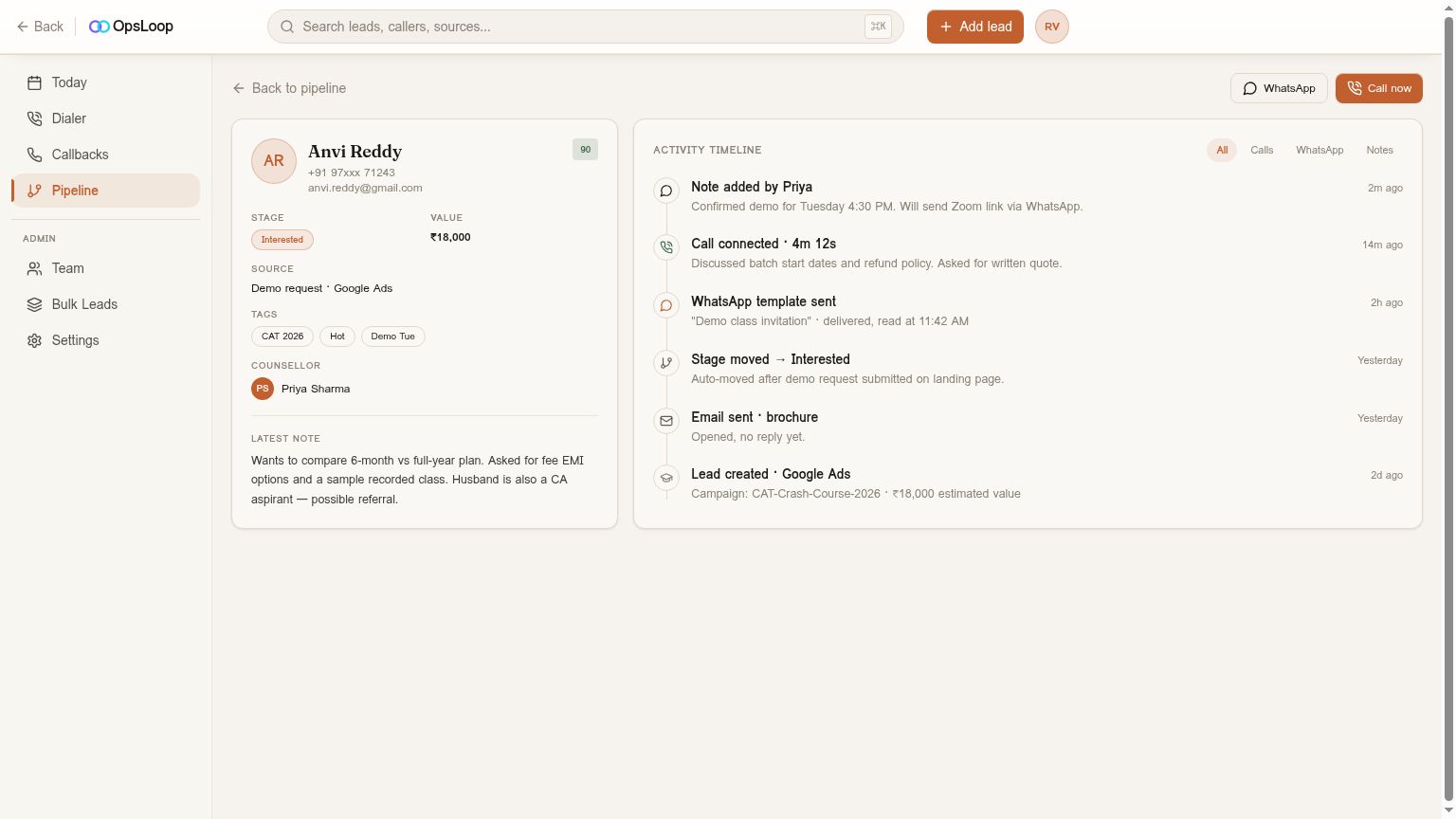
Step-by-Step Playbook for Coaching Institute WhatsApp Automation
Here’s how to implement effective WhatsApp automation for your coaching institute:
Step 1: Instant Welcome & Information Sharing for New Leads
When a new enquiry comes in (from your website, Meta/Google ads, or a landing page), speed is everything. Automate an instant welcome message.
- Goal: Acknowledge the enquiry immediately, set expectations, and provide initial useful information.
- Trigger: New lead added to CRM, or lead fills a form.
- Message Example: "Hello [Lead Name], thank you for your interest in [Course Name] at [Institute Name]! We've received your enquiry. Our team will connect with you shortly. In the meantime, here's our course brochure: [Link to Brochure] and a quick video about us: [Link to Video]. Reply 'CALL' if you'd like us to call you right away!"
- Why it works: It shows professionalism, keeps the lead engaged while hot, and provides immediate value, reducing the chances of them moving to a competitor. This also helps reduce your lead leakage significantly.
Step 2: Automated Follow-Up Sequences for Different Stages
Not every lead converts on the first interaction. Implement automated follow-up sequences tailored to the lead's stage in your admissions pipeline.
- Goal: Nurture leads, provide relevant information, and prompt further action.
- Trigger Examples:
- Post-Enquiry (no response yet): 24 hours after welcome message.
- Post-Call (no decision): 24-48 hours after a phone call or demo.
- Post-Demo/Visit (no enrollment): 2-3 days after a physical visit or online demo.
- Message Examples:
- Post-Enquiry: "Hi [Lead Name], just checking in regarding your interest in [Course Name]. Did you have a chance to look at the brochure? Let us know if you have any questions or prefer a quick call to discuss your options!"
- Post-Demo: "Hello [Lead Name], hope your demo session for [Course Name] was insightful! What were your thoughts? We're offering a special scholarship for early enrollments this batch. Want to know more?"
- Sequence Logic: Use your CRM to set up multi-step sequences. For instance, if a lead responds to a message, the automation pauses, and a human agent takes over. If no response, the sequence continues with the next message after a set delay. For more ideas, refer to our guide on WhatsApp follow-up messages.
Step 3: Reminders & Nudges for Key Milestones
Coaching institutes have many critical dates: class start, fee deadlines, document submissions. Automate reminders to ensure leads don't miss out and students stay on track.
- Goal: Reduce no-shows for demos/classes, ensure timely fee collection, and smooth onboarding.
- Trigger Examples:
- Demo/Trial Class Reminder: 1 hour before scheduled time.
- Upcoming Batch Reminder: 3 days before a new batch starts.
- Fee Due Reminder: 2 days before the fee deadline.
- Message Examples:
- Demo Reminder: "Reminder! Your demo session for [Course Name] is starting in 1 hour at [Time]. Join here: [Link]. See you there!"
- Fee Reminder: "Hi [Student Name], your fee installment for [Course Name] is due on [Date]. Please use this link to pay: [Payment Link]. Let us know if you need any assistance."
- Why it works: These timely nudges significantly improve demo show-up rates and fee collection efficiency, directly impacting your bottom line.
Step 4: Lead Qualification & Information Gathering
Instead of long phone calls just to qualify a lead, use WhatsApp automation to gather initial information efficiently.
- Goal: Understand lead requirements, filter serious prospects, and prepare your sales team for more productive calls.
- Trigger: After an initial welcome, if the lead hasn't specified their interest.
- Message Example: "To help us recommend the best program, could you tell us: 1. Which exam are you preparing for (e.g., JEE, NEET, CAT)? 2. What's your target year? 3. Are you looking for online or offline classes? Your answers will help us connect you with the right counsellor!"
- Why it works: This pre-qualification saves your team valuable time, allowing them to focus on leads that are a better fit. OpsLoop's Pipeline feature can then automatically route these qualified leads to the right counsellor.
Step 5: Document & Payment Nudges
Many enrollments get stuck because of pending documents or payments. Automate nudges to push these critical steps forward.
- Goal: Expedite the enrollment process by ensuring all prerequisites are met.
- Trigger: Lead status changes to 'Documents Pending' or 'Payment Pending'.
- Message Examples:
- Documents: "Hi [Lead Name], just a friendly reminder that we're awaiting your [Document Name] to complete your enrollment for [Course Name]. You can upload it here: [Upload Link]. Please let us know if you face any issues."
- Payment: "Hello [Lead Name], your enrollment for [Course Name] is almost complete! Please make the payment of ₹[Amount] here: [Payment Link]. This will secure your spot in the upcoming batch."
- Why it works: These targeted messages remove friction from the final stages of enrollment, ensuring fewer leads drop off at the last hurdle.
Gotchas: Don't X / Do Y
- Don't: Send generic, impersonal messages. Do: Personalise messages with the lead's name, course of interest, and specific context.
- Don't: Over-automate without any human touchpoints. Do: Use automation to handle routine tasks, but ensure your team steps in for complex queries or when a lead shows high intent.
- Don't: Use unofficial WhatsApp tools or bots that aren't built on the WhatsApp Business API. Do: Stick to API-based solutions to avoid account bans and ensure reliable delivery.
- Don't: Expect a set-it-and-forget-it solution. Do: Regularly review your automation performance, A/B test messages, and refine sequences based on conversion data.
- Don't: Forget about compliance. Do: Ensure all your automated messages adhere to WhatsApp's commerce policy and include opt-out options where appropriate. OpsLoop helps manage approved templates for this reason.
What Good Looks Like: Benchmarks for Coaching Institutes
When your WhatsApp automation is working effectively, you should see improvements in key metrics:
- Demo/Trial Class Show-up Rate: Expect to see an increase of 15% to 35% in show-up rates for scheduled demos or trial classes.
- Lead-to-Enrollment Conversion Time: The time it takes from a lead's first enquiry to final enrollment should reduce by 20% to 40%.
- Lead Response Time: Automation should bring your initial response time down to under 5 minutes, ideally instant.
- Manual Follow-up Effort: Your team's time spent on routine follow-ups should decrease by up to 60%, allowing them to focus on high-value interactions.
- Lead Leakage: You should see a significant reduction in leads going cold, potentially cutting lead leakage by half or more.
Implementing WhatsApp automation for your coaching institute isn't just about sending messages; it's about building a systematic, efficient, and engaging communication funnel that drives enrollments. By following this playbook and leveraging the right tools, you can ensure every lead receives timely attention, nurturing them effectively from initial interest to a successful enrollment.
To see how a dedicated CRM can streamline your entire admissions process, explore how OpsLoop serves coaching institutes.
Ready to automate your WhatsApp outreach and streamline your admissions process? OpsLoop offers flat-rate CRM plans designed for Indian businesses, with powerful WhatsApp automation built-in. Start your free trial today and fill your next batch faster.
Further reading
FAQ
Frequently asked
Why should coaching institutes use WhatsApp automation?
Coaching institutes should use WhatsApp automation to provide instant responses to enquiries, ensure timely follow-ups, send automated reminders for classes or fees, and streamline the entire student enrollment journey, which significantly improves lead conversion and operational efficiency.
What kind of messages can be automated on WhatsApp for coaching?
You can automate welcome messages for new enquiries, follow-up sequences after a demo or call, reminders for upcoming classes, fee due notifications, document submission prompts, and even qualification questions to gather lead information efficiently.
Do I need WhatsApp Business API for automation?
Yes, for robust, scalable, and compliant WhatsApp automation, especially with multiple users and complex sequences, you need the WhatsApp Business API. The standard WhatsApp Business App has limitations for automation and team collaboration.
How does OpsLoop help with WhatsApp automation for coaching institutes?
OpsLoop (Disclosure: OpsLoop is our product) offers integrated WhatsApp automation with approved templates, auto follow-up sequences, and reply-thread context, all within a flat-rate CRM. It's designed to manage leads from enquiry to payment, specifically for Indian businesses.
What are the common mistakes to avoid when automating WhatsApp?
Avoid sending generic, impersonal messages, over-automating without allowing for human intervention, using non-API tools that can lead to account bans, and not tracking the performance of your automated sequences. Always ensure messages add value and are relevant to the lead's stage.
Can WhatsApp automation help reduce lead leakage?
Absolutely. By ensuring instant responses and consistent follow-ups, WhatsApp automation drastically reduces the chances of leads going cold due to delayed communication. It helps capture interest while it's hot and guides leads through the funnel effectively, preventing lead leakage.
READ NEXT
WhatsApp Drip Campaign Setup: Your Indian SMB Playbook
Learn to set up effective WhatsApp drip campaigns for your Indian business in 5 steps. Improve lead conversions by up to…
WhatsApp Marketing Strategy for Small Business: Your India Playbook
Master WhatsApp marketing for your small business in India. Discover 5 key steps to engage leads, automate follow-ups, a…
How to Get Green Tick on WhatsApp Business in India (2026 Guide)
Want the official WhatsApp Green Tick for your business in India? Follow 7 clear steps to verify your brand, boost trust…
Try OpsLoop free for 14 days
Flat team plans from ₹3,000/month. No per-seat fees. No card to start.